PRD Mistakes That Doom App Projects: 10 Simple Must-Know Fixes
Introduction
A PRD is supposed to be the map. When it's wrong, your team walks in circles until the budget runs out. The most common PRD Mistakes That Doom App Projects don't announce themselves—they hide in sentences that sound reasonable until someone tries to build from them.
Vague requirements are the silent killer. They pass review because they feel complete, but they leave engineers guessing about edge cases, designers inventing flows that contradict each other, and founders wondering why the demo looks nothing like what they described. The Project Management Institute found that around 37% of project failures are a direct result of unclear requirements.
I've seen founders spend six months on a build only to realize their PRD never defined what "user dashboard" actually meant. The team built something. It worked. It just wasn't the thing anyone needed. For a detailed foundation on what a PRD should contain, see What Is a PRD? A Plain-English Guide for Non-Technical Founders.
The good news: most PRD mistakes follow predictable patterns, and the fixes are straightforward. You don't need a PhD in product management. You need to write requirements that someone can test without asking you what you meant.
Discover common prd mistakes that can lead to app project failures and learn effective fixes for them.
Common PRD Mistakes
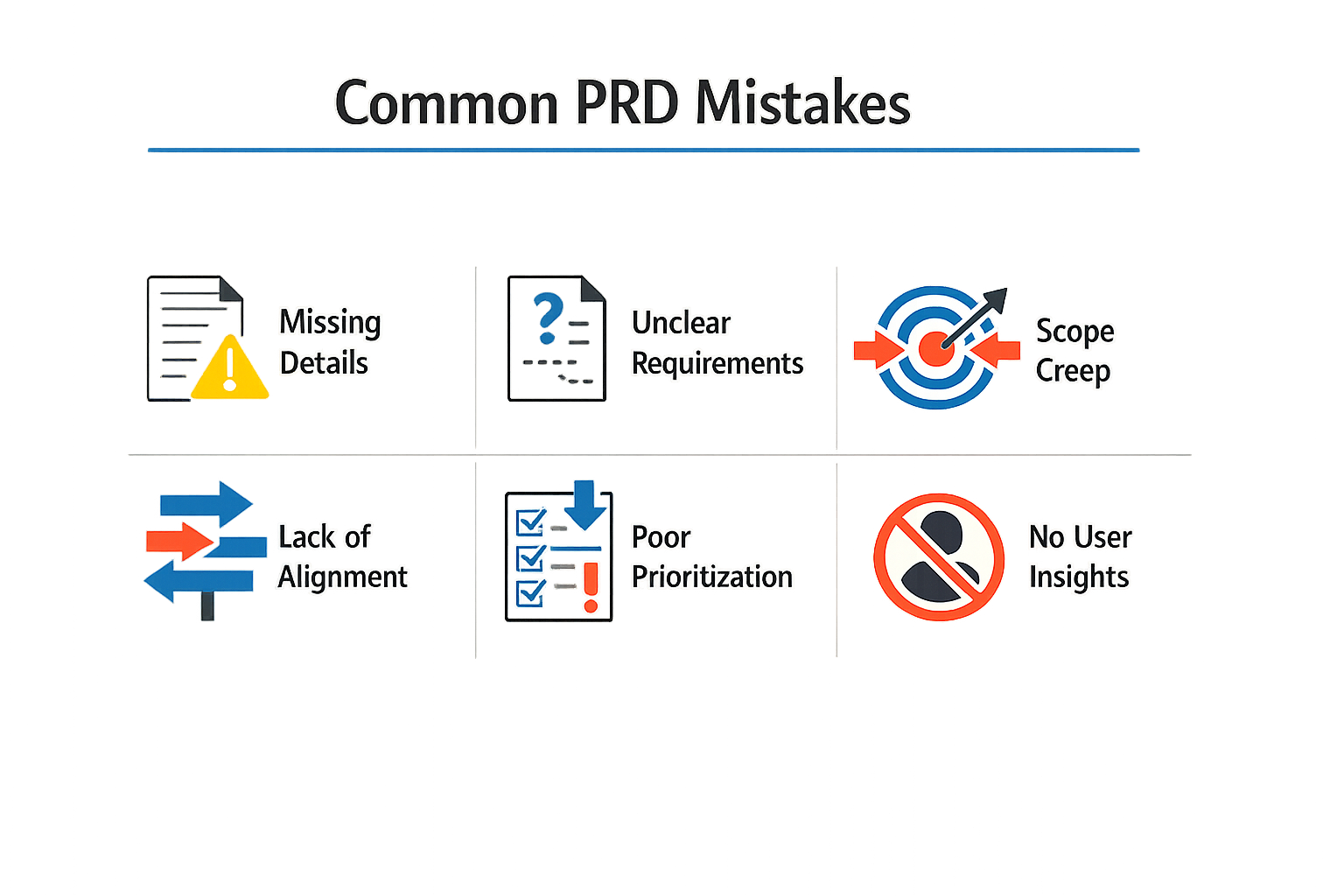
Most product requirements documents fail for the same reason: they describe features instead of problems and outcomes. You write a list of what you want built, hand it off, and six weeks later you get software that checks every box but solves nothing. The mistake is structural, not cosmetic.
The pattern repeats across projects. Teams define features before understanding users, write vague goals that mean different things to different readers, and pack PRDs with technical solutions disguised as requirements. Each mistake compounds. A vague goal becomes a giant feature list, which becomes a build that drifts further from the actual problem with every sprint.
PRD Mistakes That Doom App Projects: The Core List
Four mistakes account for most PRD failures. Vague goals let teams interpret the same sentence in incompatible ways. A giant list of features dilutes focus and makes every decision feel equally important. Technical solutions disguised as requirements lock you into implementation details before you understand the problem. Ignoring edge cases means the first real user breaks your app in ways you never planned for.
These mistakes cluster. Vague goals produce feature lists because no one knows what to cut. Feature lists invite technical solutions because specificity feels like progress. Technical solutions hide edge cases because you're thinking about code, not user behavior.
Why These Mistakes Persist
PRD mistakes persist because they feel productive in the moment. Writing "users should be able to manage their profiles" feels concrete until three people build three different profile screens. Listing twenty features feels comprehensive until you realize none of them solve the core problem. Specifying "use React hooks for state management" feels precise until you discover the real requirement was "page loads must feel instant on 3G."
The fix is not better templates. The fix is writing requirements that describe problems, outcomes, and constraints—then letting the team propose solutions. If you're reading about what makes a strong PRD, the distinction matters: requirements define the boundary of acceptable solutions, not the solution itself.
A PRD that describes features instead of problems is a build plan for the wrong product.
Each mistake has a mechanical fix, but the fixes only work if you catch the mistake before the build starts. Vague goals get fixed by defining success metrics. Giant feature lists get fixed by ranking features against a single outcome. Technical solutions get fixed by rewriting them as performance or usability constraints. Edge cases get fixed by walking through user flows with someone who has never seen the app.
The next section covers what happens when these mistakes make it into production.
Impact of PRD Mistakes on App Projects
PRD mistakes don't just slow projects down. They multiply costs, break trust with developers, and turn every sprint into a negotiation about what you actually meant three weeks ago.
The Rework Tax
Most software development costs come from fixing what was built wrong the first time. When requirements are fuzzy or incomplete, 60–80% of development spend goes to rework instead of new features. That's not a typo. You pay once to build it wrong, then again to rebuild it right.
Projects with a written PRD and signed-off scope reduce mid-project rework by 30–40%. The difference isn't the document itself—it's the forcing function. Writing forces you to decide what you want before someone starts coding.
Scope Creep and Budget Blowout
Without a clear PRD, every conversation becomes a scope discussion. "I thought this was included" becomes the most expensive sentence in your project. Developers quote based on what's written. When what's written is vague, they quote conservatively or they quote low and change-order you later.
Either way, you lose. Conservative quotes feel expensive upfront. Low quotes feel like bait-and-switch when the real bill arrives.
The cheapest vendor is the one whose paper trail you trust enough to hand the auditor without flinching.
Team Morale and Velocity
Developers hate rework more than you do. They know when requirements are half-baked. They know when "we'll figure it out as we go" means "we'll rebuild this twice." Good developers leave projects that waste their time. The ones who stay get slower and more defensive.
Velocity doesn't just drop—it becomes unpredictable. You can't plan a roadmap when every sprint uncovers three new interpretation gaps. For more on how unclear requirements derail non-technical founders, see What Is a PRD? A Plain-English Guide for Non-Technical Founders.
Product-Market Fit Risk
The worst impact isn't financial. It's strategic. When you're busy rebuilding features because the PRD was unclear, you're not testing with users. You're not iterating on feedback. You're not learning whether anyone wants what you're building.
PRD mistakes burn your runway twice: once in rework costs, once in lost time to validate your idea. By the time you ship, the market may have moved or your cash may be gone.
Fixing PRD Mistakes
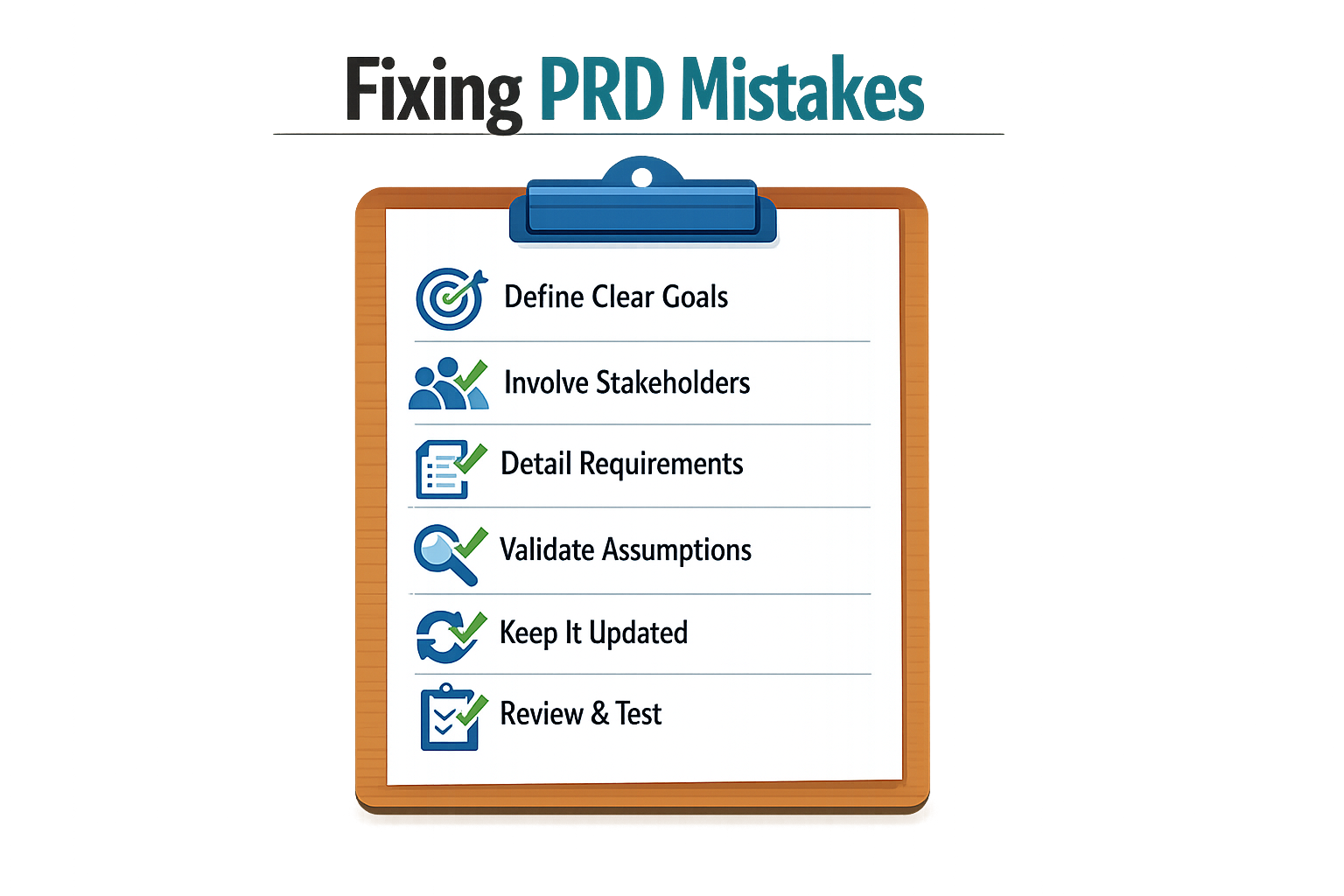
Most PRD mistakes are fixable if you catch them early. The fixes are boring, mechanical, and effective. You do not need a workshop or a framework—just a checklist and the discipline to use it.
Define Success in Numbers, Not Wishes
Vague goals kill projects slowly. Instead of writing "improve user engagement," specify "increase daily active users by 15% within Q3." The number forces clarity. The deadline forces urgency. If you cannot measure it, you cannot fix it when it breaks.
Write success metrics before you write features. If a feature does not move a metric, cut it or defer it. This discipline alone eliminates half the scope creep in typical projects.
Add a Definition of Done Checklist
End every PRD with a short "Definition of Done" checklist. This is the contract between product and engineering. It answers: what does success look like for this feature?
Example checklist:
- Feature passes automated tests
- Feature works on iOS and Android
- Analytics events fire correctly
- Documentation updated
- Stakeholder sign-off received
When everyone agrees on the checklist before work starts, you eliminate the "I thought you meant…" conversations that derail handoffs. For founders who are learning to write their first PRD, this single habit prevents more rework than any other fix.
Step 1
Draft the checklist first
Before you write feature details, list the 3–5 conditions that must be true for you to call the feature done. Share it with your engineer. Revise until you both nod.
Step 2
Attach it to the PRD
Put the checklist at the bottom of the PRD document, under a heading like "Definition of Done" or "Acceptance Criteria." Make it visible.
Step 3
Reference it in standups
When someone asks "Are we done?" point to the checklist. If an item is incomplete, the feature is incomplete. No debate.
Version Your PRD Like Code
PRDs drift. Scope changes, priorities shift, stakeholders revise opinions. If you do not version the document, you will argue about what was agreed to three weeks ago.
Version your PRD after every key decision or scope change. Use simple labels: v1.0, v1.1, v2.0. Note what changed in a changelog at the top of the document. This saves hours of confusion and prevents the "but I thought we decided…" loops that burn goodwill.
Treat the PRD as a living contract. When it changes, everyone sees the diff.
Case Studies of Failed Projects
Most product requirements documents fail for the same reason: they describe features instead of problems and outcomes. When that happens, the project doesn't just slow down—it ships the wrong thing or never ships at all.
The Vague Bullet-Point PRD
In one project, the first PRD was a mess of vague bullet points, leading to confusion among engineers. Teams read the same line and built different things. Questions multiplied. After rebuilding it with visual user flows, clarification questions dropped by over 60%. The difference wasn't talent or effort—it was that the second PRD showed what the user actually did, step by step, instead of listing abstract capabilities.
The Feature-First Disaster
Another common pattern: a PRD that reads like a feature wishlist with no user problem attached. One team built a complex dashboard because the PRD said "users need analytics." Six months in, usage was near zero. The real problem was that users needed one number—monthly burn rate—not a dashboard. The PRD described a solution without validating the problem, so the team built something nobody opened.
These aren't edge cases. They're the two failure modes that kill most projects: vagueness that fragments the team, and feature-first thinking that builds the wrong thing confidently. Both trace back to a PRD that skipped the hard work of defining the user's actual job-to-be-done.
For founders starting out, understanding what a PRD is and how to structure one prevents these patterns before the first line of code.
Lessons Learned from PRD Failures
Failed projects leave patterns. The same PRD mistakes repeat across teams, and the fix is usually simple once you see it.
Define Problems, Not Just Solutions
Most PRDs list features without explaining the underlying problem. When engineering sees "add a dashboard" but not why users need it, they build something technically correct that solves nothing. If engineering understands the problem well, they'll make better design tradeoffs without escalating decisions. Write the problem statement first. Then list solutions.
Give Engineers Context, Not Just Instructions
Many PRDs list solutions instead of defining the underlying problems, which can lead to a lack of context and ineffective features. Engineers need to know what you're trying to fix, not just what to build. When they understand the constraint — budget, timeline, user pain — they propose better alternatives. A PRD that explains the why gets better work than one that micromanages the how.
Test Assumptions Early
Failed projects often assume users want something they don't. The lesson: validate before you write the full spec. A short prototype or a five-question survey surfaces bad assumptions faster than a 20-page PRD. If you're guessing about user behavior, say so in the document. Honest uncertainty is better than confident fiction.
The cheapest way to fail is on paper — a bad PRD costs hours, a bad build costs months.
Keep Scope Tight
Every failed project has a scope-creep story. The PRD starts focused, then someone adds "just one more feature," and the timeline doubles. The lesson: write a PRD for the smallest version that solves the problem. If it works, you can add more. If it doesn't, you haven't burned the budget. For more on keeping first builds manageable, see What Is a PRD? A Plain-English Guide for Non-Technical Founders.
Document Decisions, Not Just Features
When a project fails, the first question is always "why did we build it this way?" If the PRD doesn't explain the tradeoffs — why you picked option A over B — no one remembers six months later. Write down what you decided and why. Future you will thank past you.
Best Practices for Creating Effective PRDs
A good PRD is a living document, not a monument. Write it like you're briefing a developer who will read it once and start building. Every section should answer a question they'll actually ask.
The Seven Essential Sections
A good product requirements document template has seven sections: problem statement, success metrics, user stories by persona, scope boundary, technical constraints, wireframes, and milestones with acceptance criteria. Each section exists to kill a specific kind of confusion.
Problem statement tells the team what they're solving and why it matters. Success metrics define done in numbers, not feelings. User stories by persona map who does what and why they care. Scope boundary draws the line between this build and the next one. Technical constraints list the platforms, APIs, and data rules that aren't negotiable. Wireframes show what the thing looks like. Milestones with acceptance criteria break the work into chunks you can actually test.
Version Control Is Not Optional
Version your PRD just like you would code. Keeping it updated after every key decision or change in scope saves hours of confusion later. When a stakeholder asks why something changed, you point to version 1.3 and move on.
Every version bump should tie to a decision. Scope expanded? New version. API changed? New version. Designer convinced you to rethink the flow? New version. The version number is a breadcrumb trail through the project's evolution.
Write for the Reader Who Skims
Developers skim. Designers skim. Stakeholders skim. Write short paragraphs, use bullets, and front-load every section with the conclusion. If someone reads only the first sentence of each section, they should still understand the shape of the project.
Avoid walls of text. A paragraph longer than four sentences is a sign you're explaining instead of specifying. Break it up or cut it down.
Link Requirements to Outcomes
Every feature in the PRD should trace back to a success metric or a user story. If you can't draw that line, the feature is decorative. Decorative features ship late, break often, and confuse users.
When you write "the app must support dark mode," ask why. If the answer is "users with light sensitivity need it to use the app at night," that's a real requirement. If the answer is "it looks cool," it's not.
Keep Technical Constraints Honest
Technical constraints are the things you can't change without blowing the budget or the timeline. List them early. If you're building on iOS only, say so. If the backend has to talk to a legacy API that returns XML, say so. If the database can't handle more than 10,000 records without a rewrite, say so.
Pretending constraints don't exist doesn't make them go away. It just means the developer finds out about them three weeks into the build.
For a deeper look at structuring your initial planning, see What Is a PRD? A Plain-English Guide for Non-Technical Founders.
Tools for Improving PRD Quality
You do not need specialized software to write a good PRD. A shared doc that your team can edit and comment on beats a locked PDF every time. The tool matters less than the discipline to keep it current.
Templates and Frameworks
A template forces you to answer the right questions before you start building. Use one that includes sections for user roles, success metrics, edge cases, and the rationale behind each feature. The reasoning section is what keeps the PRD useful six months later when someone asks why you built it that way.
If you are starting from scratch, look for templates that separate "what we are building" from "why we are building it." The why section is where you explain the problem you observed, the user pain point, and the metric you expect to move. When priorities shift, that context is the only thing that tells you what to cut and what to protect.
Collaboration Platforms
Google Docs, Notion, and Confluence all work. Pick the one your team already uses for other documentation. The key feature is inline comments—your designer needs to be able to ask "what does 'streamlined' mean here" without scheduling a meeting.
Version history matters more than you think. When a feature gets descoped, you want a record of what was originally planned and why it changed. Treat your PRD like source code: every meaningful edit gets a note explaining what changed and who approved it.
For teams working with AI tools or vibe coding workflows, keep the PRD in the same workspace as your prompts and generated code. When the AI hallucinates a feature that was never specified, you need one source of truth to point at.
Review and Feedback Systems
Schedule a PRD review before any work starts. Invite the engineer who will build it, the designer who will spec it, and at least one person who was not involved in writing it. The outsider catches assumptions you did not realize you made.
Set a review cadence that matches your sprint length. If you ship every two weeks, review the PRD every two weeks. Mark sections that changed since the last review. If nothing changed, the review takes five minutes. If major sections changed, you catch drift before it becomes rework.
Use a checklist for every review: Does this PRD define success metrics? Does it explain what happens when the user does something unexpected? Does it include at least one thing we explicitly decided not to build? If you cannot answer yes to all three, the PRD is not done.
Who Should Choose What Fix
Not every PRD mistake requires the same fix. The right correction depends on your team size, technical depth, and how far into the build you are. A solo founder with a weekend prototype needs a different approach than a funded team hiring contractors.
Match the Fix to Your Setup
If you're working alone or with one technical co-founder, start with a clear user problem statement at the top of your PRD. That single line keeps scope from drifting when you're the only person making trade-offs. Skip the formal sign-off process — you are the sign-off — but do write down what you're building and why.
Small teams (2-4 people) benefit most from a written PRD with explicit scope boundaries. Projects with a written PRD and signed-off scope reduce mid-project rework by 30-40%, based on delivery data across dozens of client builds. When you're paying contractors or splitting equity, that reduction in churn matters. One person writes the PRD, everyone else reviews it, and you lock it before the first line of code.
Larger teams or agency builds need the full stack: problem statement, scope sign-off, versioned requirements, and a single owner for the document. When multiple people touch the PRD, you need one throat to choke. Assign ownership on day one.
When You're Already Mid-Build
If the project is underway and the PRD is a mess, triage by pain. Is scope creeping? Lock the current feature set and defer everything else to a named future phase. Are developers asking the same questions twice? That's a sign the PRD is vague — rewrite the unclear sections with concrete examples and edge cases.
Don't rewrite the entire PRD while the build is live unless the project is already stalled. Fix the section that's causing the most friction today, then move on. For practical guidance on structuring your first PRD from scratch, see What Is a PRD? A Plain-English Guide for Non-Technical Founders.
Conclusion
Most app projects fail before the first line of code ships. The PRD is where that failure starts—or where you stop it. Every mistake covered here traces back to the same root: writing for the wrong audience or skipping the work that makes requirements testable. Fix those two things and most PRD problems solve themselves.
A good PRD doesn't prevent every surprise. It prevents the expensive ones—the kind that surface three sprints in when half the team thought "user profile" meant LinkedIn integration and the other half built a settings page. Clarity costs you an afternoon of writing. Ambiguity costs you weeks of rework and a demoralized team.
Treat your PRD like a living document that evolves as you learn, rather than a static relic. Lock down the must-haves before kickoff, then update edge cases and dependencies as the build surfaces them. The teams that ship fastest are the ones who reopen the PRD when a question comes up, add two sentences, and move on—not the ones defending a document they wrote six months ago.
If you're still figuring out how to structure your first PRD or how much detail actually matters, start with What Is a PRD? A Plain-English Guide for Non-Technical Founders. The format matters less than the discipline: write it down, make it testable, keep it current. Do that and you're already ahead of most projects that fail.
Related reading
How to Find App Ideas: 9 Simple Frameworks That Actually Work