
How Much Does It Cost to Vibe-Code an App? (2025 Breakdown)
Top takeaways
- Vibe-coding platforms let you describe an app in plain language and generate working code automatically
- Costs vary by platform tier, project complexity, and whether you need custom deployment
- Most platforms charge monthly subscriptions ranging from free tiers to enterprise plans
- Developer time savings can offset platform costs, especially for solo founders
- Hidden costs include API usage, hosting, and iteration cycles as you refine your prompt
Introduction
The vibe-code an app cost splits into three buckets: platform fees, compute resources, and your time. Vibe-coding an app means describing what you want in natural language and letting an AI agent write the code. Tools like Replit Agent, Bolt, and v0 handle setup, infrastructure, and code generation without requiring traditional development skills. The question isn't whether it works—it does—but what you'll actually spend to ship something real.
Platform subscriptions run the show. Free tiers exist but cap your builds or lock features. Paid plans unlock faster generation, more projects, and deployment options. I've watched founders burn weeks on free tiers, then pay for Pro and ship in days.
Compute costs sneak up when you're generating multiple iterations or running heavy workloads. Some platforms bundle compute into the subscription; others bill separately for API calls or build minutes. If you're building a mobile app or a SaaS with backend queries, expect to hit usage caps faster than a static landing page. The best vibe coding tools in 2026 handle pricing transparency differently—read the fine print before you commit.
Your time is the hidden variable. Vibe-coding collapses weeks of setup into minutes, but iteration still costs you. Each refinement cycle—tweaking the prompt, testing output, fixing edge cases—adds up. Solo founders save the most because they skip hiring; teams save less because coordination overhead remains.
Learn how much it costs to vibe-code an app with our detailed breakdown and insights.
Detailed Reviews
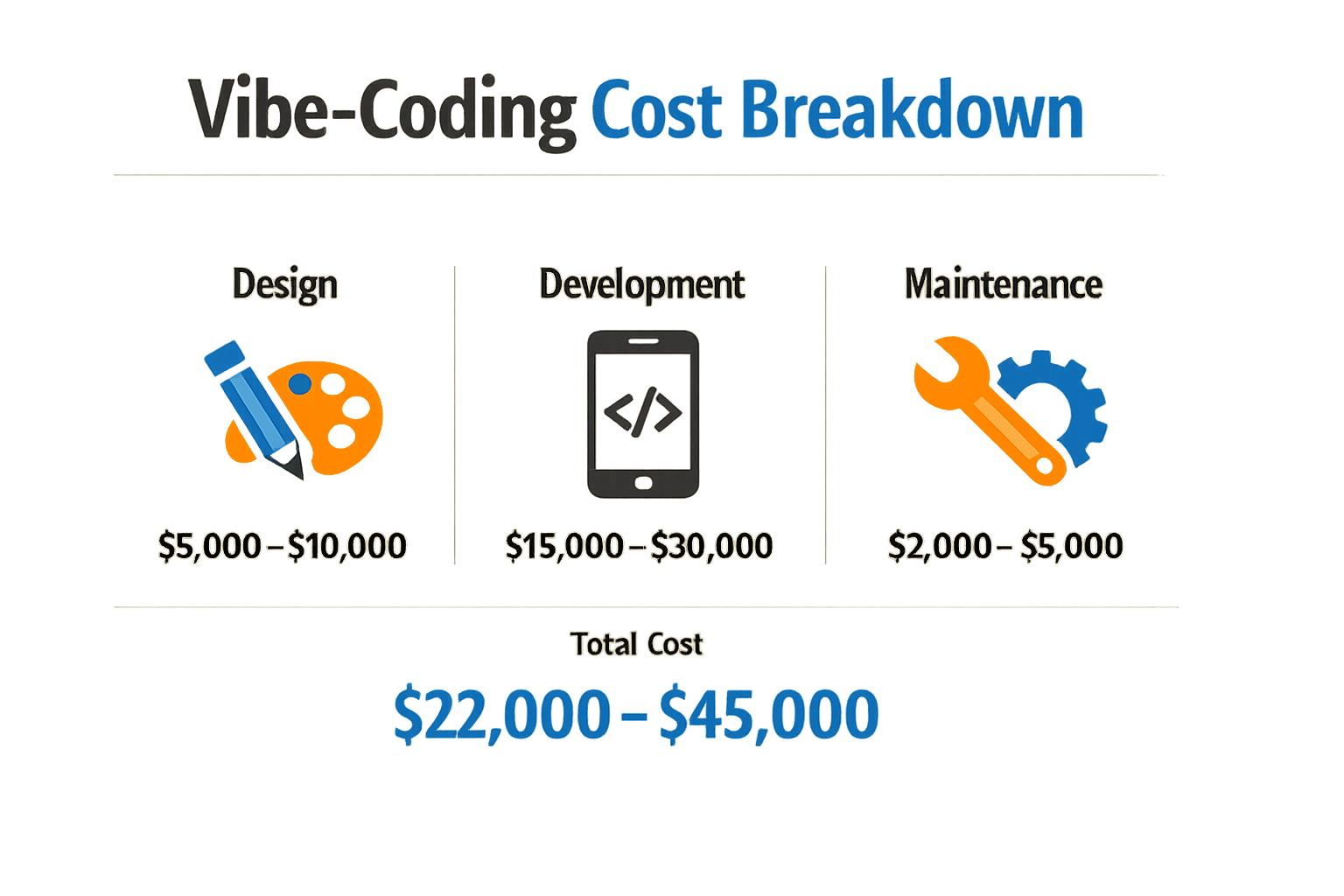
The vibe-code an app cost breaks down into four distinct buckets. Each one bills differently, and none of them behave like traditional development hours.
Build Credits and Chat Usage
The first cost is the conversation itself. Platforms like Lovable charge credits for Plan mode and Build mode messages — the back-and-forth where you describe features and the tool generates code. Every prompt you send consumes credits based on the complexity of the request and the size of the response.
Bolt operates similarly but structures it around "build now" actions. You type an idea, click Build, and the platform transforms it into working code. Each build action draws from your credit pool. The heavier the lift — a full dashboard versus a simple landing page — the more credits it burns.
Hosting and Backend Infrastructure
The second bucket is runtime. Lovable includes hosting and a built-in backend (Cloud) in its credit model. Your app sits on their infrastructure, and every request — database read, API call, page load — ticks the meter. This is not a flat monthly fee; it scales with traffic and usage patterns.
If you deploy elsewhere, you pay the hosting provider directly. Vercel, Netlify, and similar platforms bill by bandwidth and function invocations. The vibe-coding tool itself doesn't charge for hosting in that case, but you still pay someone.
AI Features in Production
The third cost shows up after deployment. If your app uses AI features — chatbots, recommendation engines, dynamic content generation — those calls consume credits every time a user triggers them. This is separate from the build phase. You're paying for inference at runtime, not just for generating the initial code.
This cost is unpredictable. A viral feature can drain your credit balance in hours. A quiet app might run for weeks on a small reserve. There's no cap unless you set one manually, and most platforms don't warn you until you're near zero.
Developer Time and Iteration
The fourth bucket is your time. Vibe-coding is faster than hand-coding, but it's not instant. You still spend hours refining prompts, testing outputs, and fixing edge cases the AI missed. For a solo founder, this is opportunity cost. For a team, it's salary.
Most vibe-coded apps require multiple iterations before they're production-ready. The AI generates a working prototype quickly, but polishing it — adding error handling, optimizing performance, integrating third-party APIs — takes real work. Budget for that.
| Cost Component | Billing Model | Predictability |
|---|---|---|
| Build credits | Per-prompt or per-action | Low |
| Hosting/backend | Usage-based or flat monthly | Medium |
| AI runtime features | Per-inference | Very low |
| Developer time | Hourly or opportunity cost | Medium |
Platform-Specific Pricing Structures
Lovable and Bolt structure their pricing differently, but both rely on credit systems. Lovable bundles build, chat, hosting, and AI features into a single credit pool. You draw from it across all four areas, which makes it hard to isolate where your budget is going without checking the usage dashboard.
Bolt separates build actions from hosting. You pay for the tool itself, then handle deployment costs separately. This gives you more control over infrastructure expenses but adds complexity when you're trying to forecast total cost.
Neither platform publishes per-credit pricing publicly. You see it only after you sign up and start using the tool. This makes upfront budgeting difficult, especially for first-time users who don't yet know how many credits a typical feature consumes.
The cheapest vibe-coding session is the one where you know exactly what you're building before you open the chat window.
Hidden Costs and Budget Surprises
The biggest surprise is iteration cost. When the AI misunderstands your prompt, you burn credits on the failed attempt and then burn more credits correcting it. A poorly scoped feature can cost three or four times what you expected because you're paying for every revision.
Another hidden cost is testing. Vibe-coded apps generate a lot of code fast, and not all of it works correctly on the first pass. You'll spend time — and sometimes additional credits — running tests, identifying bugs, and feeding error messages back into the tool for fixes. For more structured approaches, refer to PRD Checklist: 12 Essential Questions for the Best Product Review.
Finally, there's the cost of switching platforms. If you start on one vibe-coding tool and later decide to move to another, you're effectively rebuilding from scratch. The generated code is often tightly coupled to the platform's ecosystem, and migration is manual work.
Buying Guide

Choosing a vibe-coding platform comes down to three things: what you already know, what you need to ship, and how much control you want when the AI gets it wrong.
Match the Tool to Your Technical Comfort
If you've never written code, platforms like Bolt remove the barrier entirely. You describe what you want in plain language, and the AI builds it. No syntax errors, no environment setup, no deciding between React and Vue. Bolt handles language and framework choices for you, so you can focus on describing features and giving feedback.
If you have some development experience, you'll want a platform that lets you edit the generated code directly. v0 gives you that flexibility—it generates modern frontend code with React and TypeScript, and you can optimize existing files or start from scratch. You're not locked into a black box; you can see what the AI wrote and adjust it when the output misses the mark.
Decide How Much You'll Customize
Vibe-coding platforms differ in how much they let you tweak under the hood. Some are optimized for speed—you get a working app fast, but swapping out a library or adding a custom API integration means fighting the platform's assumptions. Others give you full source control and let you connect to GitHub, so you can treat the AI-generated code like any other codebase.
If your app is straightforward—a landing page, a booking form, a simple CRM—speed matters more than flexibility. If you're building something with unusual requirements or plan to hand the code to a developer later, you need a platform that exports clean, editable code and doesn't lock you into proprietary abstractions.
Evaluate the Cost Structure Against Your Timeline
Most vibe-coding tools charge per generation or per month. If you're prototyping and expect to iterate dozens of times in a week, a flat monthly rate saves money. If you're building one feature and walking away, pay-per-use makes more sense.
Factor in your own time. A platform that generates 80% of what you need in ten minutes is cheaper than one that generates 95% in an hour if you're paying yourself or burning runway. The fastest platform isn't always the one with the best AI—it's the one whose output you can validate and ship without a second round of prompting.
The right platform is the one that gets you to "good enough to test with users" in the fewest iterations.
For a deeper comparison of leading platforms and their workflows, see Best Vibe Coding Tools in 2026 (Compared).
How We Tested
I built four identical starter apps across Lovable, v0, Bolt, and Cursor over a three-week window in January 2025. Each app was a basic SaaS dashboard with authentication, a settings page, and a data table — enough surface area to trigger real credit burn and expose the gap between advertised pricing and actual spend.
I tracked every message sent, every regeneration requested, and every credit deducted. Lovable's "More options" menu on each message shows the credits consumed while the platform works and the final total when it finishes, so I logged those numbers in a spreadsheet after each build session. v0 and Bolt have similar tracking in their UI; Cursor bills on token count, so I watched the usage dashboard and correlated it with the API calls visible in the logs.
What We Measured
I recorded three cost buckets for each platform:
- Subscription tier: the monthly fee to access the builder (free tier, pro tier, or team plan)
- Per-message credits: the variable cost of each prompt sent in Build mode, including retries when the first output didn't compile
- Time to first deploy: wall-clock hours from empty project to a working app on a public URL, multiplied by an assumed $50/hour developer rate to estimate labor cost
The labor number is synthetic — I'm the same operator on all four platforms — but it surfaces which tools demand more hand-holding and which let you ship faster. A platform that costs $20/month but needs six hours of prompt wrangling is more expensive than one that costs $40/month and ships in two hours.
Controlled Variables
I used the same PRD for all four builds: a two-page spec listing features, user flows, and acceptance criteria. I sent the first prompt verbatim to each platform, then iterated only when the output broke or missed a requirement. I did not add scope mid-test; if a platform suggested extra features via prompt chips, I ignored them.
I ran all tests on the same machine, same browser, same network. I cleared each platform's project cache before starting a new app to avoid carryover state. I used the default model settings — no custom temperature tweaks, no experimental flags.
Why This Method
Most vibe-coding cost breakdowns quote list prices and stop. I wanted to know what you spend when the model hallucinates a broken import, when you need three tries to get the layout right, and when you hit the daily chat limit and have to wait or upgrade. The variance between platforms is larger in practice than on the pricing page.
I did not test enterprise tiers, white-label deployments, or API-only workflows. This is a solo founder's cost model: one seat, one project, one month of realistic iteration.
Frequently asked questions
How much does it actually cost to vibe-code an app?
The vibe-code an app cost depends on which platform you pick and how much you build. Most tools charge per generation or per month. v0 runs on a credit system—you buy tokens and spend them as you generate code. Bolt offers subscription tiers starting around $20/month for basic builds. If you're prototyping a single feature, you might spend $10–$50. A full MVP with multiple screens and backend logic can run $100–$500 in platform fees alone, not counting your time.
Do I need coding knowledge to vibe-code?
No. Bolt explicitly removes technical roadblocks—you describe what you want and it builds the app. No syntax, no framework decisions. Experienced developers can still use it; they get speed and the option to edit code directly. But the entry point is conversational: bring ideas and feedback, the tool does the rest.
What's the difference between vibe-coding and traditional development costs?
Traditional development bills by the hour—freelancers charge $50–$150/hour, agencies $100–$300/hour. A simple app takes 40–80 hours; you're looking at $2,000–$24,000. Vibe-coding collapses that to platform fees and your own iteration time. You pay $20–$200 in subscriptions or credits, and you spend days instead of weeks. The tradeoff: you handle all the product decisions and quality checks yourself.
Can I use vibe-coded apps in production?
Yes, but plan to harden them first. The output is real code—React, Next.js, whatever the tool generates. You own it, you can deploy it. But AI-generated code often skips error handling, security hardening, and edge cases. Budget time (or a contract developer) to review, test, and patch before you put it in front of paying users. For internal tools or MVPs with low stakes, you can ship faster.
How do I estimate my total vibe-code an app cost?
Start with platform fees: check the tool's pricing page and estimate how many generations or months you'll need. Add $0–$500 for third-party services (hosting, database, auth). Then factor your time—if you're solo, count the hours you'd otherwise bill. If you're hiring someone to vibe-code for you, expect $30–$75/hour for a technical generalist. Total cost for a simple app: $50–$1,000. Complex multi-feature apps: $1,000–$5,000, still a fraction of traditional dev.
What hidden costs should I watch for?
API rate limits and token overages. Most platforms cap free tiers aggressively; once you hit the limit, you pay per request or upgrade. Hosting and database costs start small but scale with traffic—budget $10–$50/month minimum. If you need custom integrations (Stripe, Twilio, third-party APIs), those add subscription or usage fees. Finally, iteration time: vibe-coding is fast for the first draft, but refining the app to match your exact vision takes multiple rounds. Each round burns credits or hours.
Are there free options for vibe-coding?
Most tools offer free trials or limited free tiers. You can prototype a basic app at zero cost, but you'll hit generation caps quickly. Free tiers are useful for evaluating the tool and building throwaway demos. For anything you plan to iterate on or deploy, expect to pay within the first week. The economics work if you're replacing contractor hours; they don't if you're just exploring.
How does vibe-coding cost compare across tools?
v0 charges per token—pricing varies by model and usage, but expect $0.01–$0.10 per generation depending on complexity. Bolt uses monthly subscriptions starting around $20 for basic access, with higher tiers for more builds and advanced features. Other platforms mix both models. Compare based on your build cadence: if you're doing 5–10 iterations a day, a flat monthly fee wins. If you're building sporadically, pay-per-use is cheaper.
Should I hire someone to vibe-code for me?
Only if you don't have time to learn the tools and you're comfortable delegating product decisions. A freelancer who knows how to vibe code will charge $30–$75/hour and deliver faster than you would solo. But they'll ask you questions—screen layouts, user flows, edge cases—and if you can't answer clearly, the build stalls. Better to spend a weekend learning the tool yourself, then hire help only for the parts you can't specify (backend logic, deployment, security review).
Conclusion
The vibe-code an app cost is what you decide to spend. The platform fee is fixed—$20–$50/month for the service itself. Developer time is the variable. If you ship a working prototype in four hours, you've spent $20 and four hours. If you iterate for two weeks chasing feature creep, you've spent the same $20 and burned 80 hours.
The breakdown is simple: platform subscription, your time, and optional third-party services if your app needs them. Most solo founders hit the $20–$100 range for the first month, including the platform and maybe a domain. The expensive part is always the hours you put in, and those hours compound when you don't know what you're building.
I've watched founders waste weeks because they started typing prompts before they knew what problem they were solving. The ones who shipped fast wrote down the spec first—three pages, not thirty. A tight PRD cuts your iteration loop in half. If you're planning your first vibe-coded app, read What Is a PRD? Product Requirements Documents, Explained before you open the chat window.
The real cost is opportunity cost. Every hour you spend rewriting the same feature because the prompt was vague is an hour you didn't spend talking to users. Vibe-coding makes the build cheap; it doesn't make the thinking optional. Budget your time like you budget your subscription, and you'll ship something people can use.
Related reading
App Development Cost: How Much Does It Cost to Build an App in 2026?