
Vibe Coding vs No-Code: Key Differences Explained
Top takeaways
- Vibe Coding vs No-Code represents two distinct development paradigms: AI-generated code versus visual builders
- Vibe Coding uses natural language prompts to generate code with AI agents, while No-Code relies on visual builders and pre-built components
- Vibe Coding gives experienced developers speed and full code control; No-Code removes technical barriers for non-developers
- Both approaches accelerate development, but they serve different user bases and offer different levels of customization
- The choice between Vibe Coding vs No-Code depends on your technical background, project complexity, and need for code-level access
Introduction
Software development has two new shortcuts. Vibe Coding vs No-Code is the central question for anyone building software in 2026. Vibe Coding turns plain English into working code through AI agents. No-Code platforms let you drag, drop, and configure without writing a line. Both promise faster builds. Neither is a strict replacement for the other.
Vibe Coding describes what you want—"build a user dashboard with real-time analytics"—and the AI writes the implementation across multiple files using modern frontend tools. You still see the code. You can edit it directly. Platforms like v0, Bolt, and Claude Code generate React components, API routes, and database schemas from conversational prompts.
No-Code platforms remove coding entirely. You pick templates, wire up logic with visual flows, and publish. They're built for speed and accessibility. Non-technical founders ship MVPs. Marketers build landing pages. Operations teams automate workflows. The platform handles the code; you handle the configuration.
I've prototyped SaaS features both ways. Vibe Coding gave me production-ready components I could version-control and refactor. No-Code got a working prototype live in hours but hit a wall when I needed custom integrations. The best vibe coding tools in 2026 reflect this trade-off: speed with flexibility versus speed with guardrails.
The real question isn't which is better. It's which matches your constraints—technical skill, timeline, and how much you'll need to change under the hood later.
What Makes Choosing Between Vibe Coding vs No-Code So Difficult?
Choosing between vibe coding and no-code isn't obvious. Both promise faster builds. Both let you ship without a full dev team. The surface-level pitch sounds identical, which is why founders waste weeks testing the wrong tool.
The real problem is that the two approaches solve different constraints. No-code platforms give you a fixed set of components and a visual builder. You drag, drop, configure. You're productive immediately, but you hit walls the moment your app needs behavior the platform didn't anticipate. Vibe coding gives you an AI that writes actual code. You prompt, review, merge. You can build anything the underlying language supports, but you inherit all the complexity of a real codebase — dependency conflicts, deployment pipelines, code review overhead.
The Hidden Cost of Picking Wrong
Most people frame this as a speed question. They ask "which one ships faster?" That's the wrong question. The real question is "which one lets me iterate without rewriting everything in six months?"
No-code tools lock you into their data model and their component library. If your app outgrows the platform, you don't refactor — you rebuild from scratch in a different stack. This has happened to three different SaaS founders in the last year. They hit 500 users, needed a custom workflow the platform couldn't support, and spent four months rewriting in Next.js.
Vibe coding gives you flexibility, but it dumps all the maintenance cost onto you. AI-generated code can look correct but still have subtle issues — missing edge cases, security holes, duplicated logic that works today but breaks when you scale. Your standards for what gets merged should be the same whether the code was written by hand or by an agent. If you can't review the output, you're not shipping faster; you're accumulating technical debt at AI speed.
The Real Decision Point
The choice isn't about your skill level. It's about your product's trajectory. If you're validating an idea and the platform's constraints won't block your core feature set, no-code gets you to users fastest. If you're building something that will need custom logic, integrations, or performance tuning within the next year, vibe coding saves you the rewrite.
Most guides tell you to "start with no-code and migrate later." That only works if migration is cheap. It's not. Migration means rebuilding your data layer, rewriting your business logic, and re-testing every workflow. For a tool like Lovable, you're working with real React and Supabase from day one — no migration tax when you need to scale.
The problem isn't that one approach is better. The problem is that picking wrong costs you months you don't get back.
Solution Steps
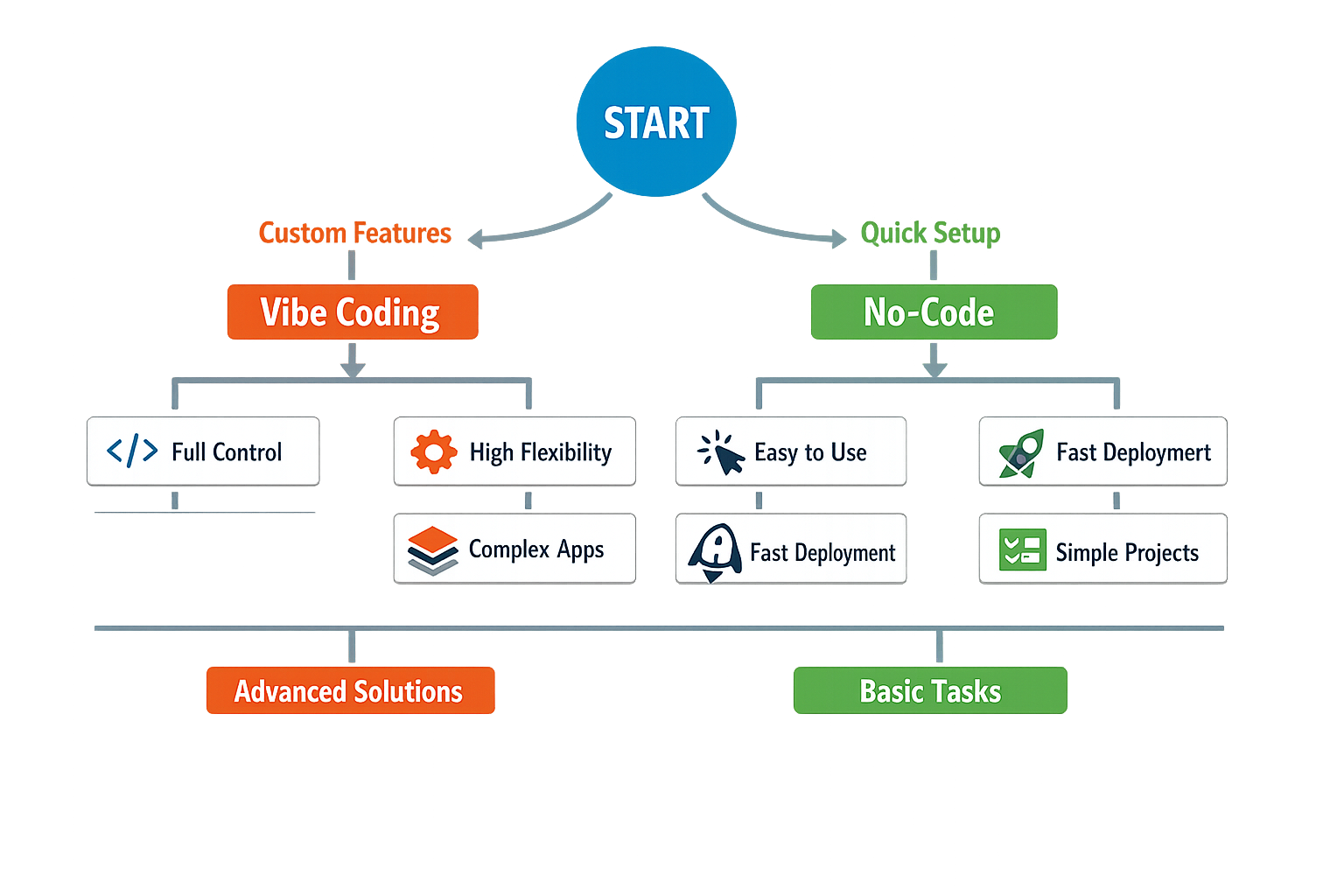
Choosing between Vibe Coding vs No-Code depends on three things: what you're building, who's building it, and how fast you need to move. Here's how to decide.
Step 1: Define Your Project Scope
Start by writing down what you actually need. If you're building a landing page or a CRUD app with standard workflows, no-code platforms handle it. If you need custom logic, API integrations beyond pre-built connectors, or anything that touches real user data at scale, you're in vibe coding territory.
List every feature, integration, and edge case. If more than 30% of your list requires workarounds or "we'll figure it out later," no-code will cost you more in rework than vibe coding costs upfront.
Product managers use tools like Bolt to go from insight to working prototype in hours, not days. That speed matters when you're testing ideas with real users. Entrepreneurs build complete businesses—company site, product, admin panel—without waiting on a dev shop.
Step 2: Assess Your Team's Technical Baseline
No-code works when your team has zero coding knowledge and the platform's visual builder matches your mental model. Vibe coding works when someone on your team can read code, spot a broken API call, or debug a deployment error.
If you're a solo founder with no technical co-founder, vibe coding gives you flexibility and control that no-code platforms lock behind upgrade tiers. You choose your languages and frameworks. You connect to source control. You edit code directly when the AI misses.
Step 3: Evaluate Speed vs. Customization Trade-offs
No-code is faster to first deploy. Vibe coding is faster to second deploy—the one where you fix what the no-code platform couldn't do. Best Vibe Coding Tools in 2026 (Compared) breaks down which tools handle which trade-offs.
Rapid prototyping and iteration are where vibe coding wins. You align stakeholders and validate ideas early. You deploy to production immediately or open a pull request for review. You fix errors with intelligent diagnostics instead of waiting for platform support.
Step 4: Plan Your Exit Strategy
Before you commit to either path, ask: what happens when this outgrows the tool? With no-code, you rebuild from scratch or pay escalating SaaS fees. With vibe coding, you hand the codebase to a developer or keep iterating with the same AI agent.
The decision isn't permanent, but switching costs are real. Choose the path that keeps your options open. For structured planning that works with either approach, see What Is a PRD? Product Requirements Documents, Explained.
Tips and Tricks
Most developers who pick the wrong approach waste two weeks before they notice. The signal is always the same: you're fighting the tool instead of solving the problem.
Break Changes Into Reviewable Chunks
AI-generated code ships fast. That speed creates a new bottleneck: your ability to review what shipped. When a change is too large to review comfortably, break it into smaller pieces. This applies whether you're using Cursor, v0, or any other vibe-coding tool. Small diffs catch bugs that vanish in 500-line PRs.
Verify Edge Cases in AI Output
AI-generated code can look correct but miss edge cases, introduce security gaps, or duplicate logic you already wrote. The code compiles. The tests pass. The bug ships anyway. Set a review checklist: does this handle null inputs, does it respect auth boundaries, does it match existing patterns. Run it against real data before you call it done.
Use API Integrations to Extend Vibe Coding
The v0 API gives programmatic access to AI-powered code generation. You can call it from your own scripts, integrate it into CI pipelines, or trigger builds from external tools. This turns vibe coding from a one-off workflow into a repeatable system. If you're building multiple similar components, automate the generation step and review the output in batch.
The best vibe-coding workflow is the one you can run twice without rewriting the prompt.
Know When to Switch Approaches Mid-Project
You can start in no-code and migrate to vibe coding when you hit a wall. You can prototype in vibe coding and lock it down with traditional code review before production. The approaches are not mutually exclusive. The mistake is staying in the wrong mode after the tool stops working. If you're writing custom code to bypass a no-code platform's limits, you've already switched—make it official.
For a structured way to plan these transitions, see PRD for Cursor: The Ultimate Guide to Stress-Free AI Specs.
Conclusion
Vibe Coding vs No-Code isn't a binary choice — it's a spectrum. No-code platforms lock you into their abstractions; vibe coding gives you real code you can edit, version, and deploy anywhere. The no-code ones hit a ceiling fast, and the vibe-coded ones kept scaling because you owned the artifact.
For rapid validation, no-code works. For anything you plan to maintain past month two, vibe coding wins. Tools like Bolt and v0 let experienced developers move faster without sacrificing control — you pick your stack, connect to source control, and edit the generated code directly when the AI misses. Agencies use this to deliver more client work without hiring; solo founders use it to compress timelines from quarters to weeks.
The real unlock isn't speed alone — it's that vibe coding produces deployable code you can hand to a traditional dev team later. No-code exports are migrations; vibe coding outputs are pull requests. If your project might outlive the prototype phase, start with vibe coding and save yourself the rewrite.
For a structured workflow that pairs vibe coding with proper planning, see How to Vibe Code: A Step-by-Step Workflow Guide — it covers the full cycle from PRD to production handoff.